

CineFlow AI OTO review dissects a hypothetical AI video suite marketed heavily at musicians—session clips, lyric visuals, tour recaps, and short-form promo—in the format you actually encounter at checkout: a low front-end price followed by a staircase of one-time offers. CineFlow AI is a fictional composite built from common launch-funnel patterns in creator SaaS; it is not a verified live product. That framing matters because OTO stacks are designed to maximize cart value in the ten minutes after your first click, not to help you compare total cost of ownership against CapCut, Adobe Premiere Pro, or DaVinci Resolve.
This review maps the typical funnel, stress-tests what each upsell tier usually adds versus what musicians need weekly, and ends with a scorecard for buy-or-skip decisions. Illustrative dollar figures below are labeled as such—composite ranges observed across AI video launches in 2024–2026 cycles, not a quote from any single vendor.

Musicians evaluating AI video tools should model full funnel cost—not the headline front-end price on the sales page.
What CineFlow AI Claims to Be
In the composite marketing story, CineFlow AI positions itself as an AI-native editor for music creators: import a performance clip or stem export, auto-detect beat markers, generate caption styles matched to genre aesthetics, batch-render vertical cuts for TikTok and Reels, and optionally produce lyric-kinetic typography from uploaded text. The pitch targets artists who hate timeline editing but still need more polish than a phone trim. Cloud rendering, template libraries, and “one-click tour recap” modules appear in nearly every slide deck variant of this category.
None of that is inherently fraudulent—several real products approximate pieces of this stack. The analytical problem is structural: the core checkout rarely includes the features shown in the demo video. Those features sit behind OTO1 (Pro Templates Pack), OTO2 (Unlimited Renders + Commercial License), and OTO3 (Agency / White-Label / Reseller tier). Understanding the funnel is prerequisite to any fair comparison with established NLEs or mobile editors.
OTO Funnel Map: Where the Money Stacks
A standard CineFlow-style launch sequences four payment moments in one session. Front-end (FE) unlocks browser access and a capped template set—often fifty to eighty exports per month and watermark-free only on a subset of styles. OTO1 sells depth: premium motion packs, genre-specific lyric templates, and “sync-to-stems” refinement. OTO2 sells scale: unlimited cloud minutes, 4K output, commercial clearance language, and priority render queue. OTO3 sells business identity: sub-accounts for band members, resell rights, or white-label client portals—features irrelevant to most solo artists but emotionally pitched as “turning content into income.”
Downsell paths mirror each OTO at roughly half price. Scarcity timers are cosmetic—the stack typically reopens on the next affiliate push. Treat the funnel as one bundled capex decision, not four calm comparisons over a week.
Illustrative Pricing Stack (Composite, Not Live Quotes)
Illustrative front-end: $27–$47 one-time or low annual intro. Illustrative OTO1: $67–$97. Illustrative OTO2: $97–$147. Illustrative OTO3: $147–$197. Illustrative full-stack checkout: $338–$488 before any subscription re-bill. Many composites also add a $9–$19/month “hosting & AI credits” fee after year one. Label every spreadsheet row “illustrative” until you read live terms at purchase time.
OTO Funnel Cost Stack Diagram
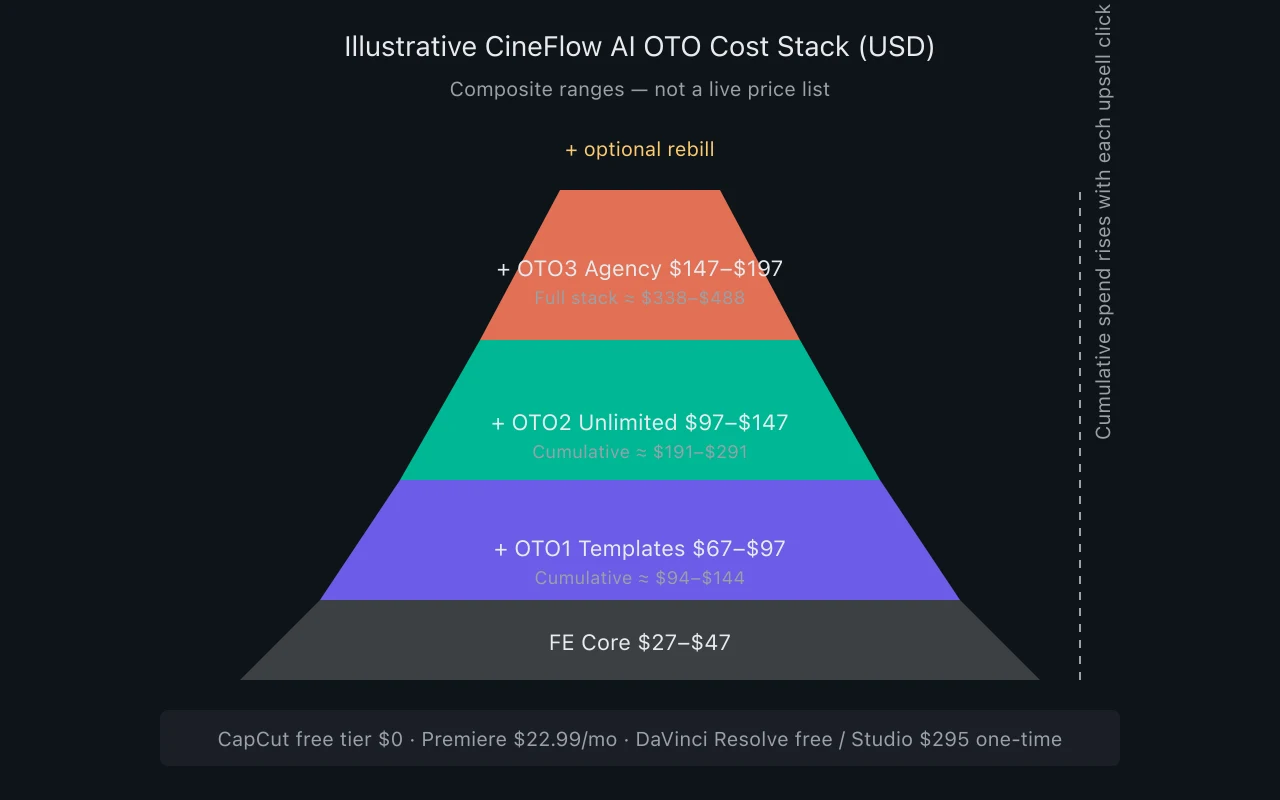
CineFlow AI illustrative OTO cost stack
The stack visualizes why “$37 lifetime access” headlines mislead: musicians who need unlimited 4K lyric videos and commercial clearance often land near mid-tier NLE annual spend—in one afternoon of upsell clicks.
Core vs OTO Feature / Value Matrix
| Capability | FE Core | OTO1 Pro | OTO2 Scale | OTO3 Agency | Musician value (1–5) |
|---|---|---|---|---|---|
| Beat-sync auto cuts | Basic / capped | Genre packs | Same + batch | Sub-account batch | 4 — saves time on shorts |
| Lyric kinetic typography | 3 templates | 40+ templates | Custom font upload | Client branding | 5 if lyrics-led promo |
| Export resolution | 1080p, watermark risk | 1080p clean | 4K | 4K + logo slot | 3 unless YouTube 4K focus |
| Monthly render minutes | 30–60 min | 120 min | Unlimited* | Unlimited* | 5 for weekly posters |
| Commercial license clarity | Personal use blur | “Social” license | Explicit commercial | Reseller rights | 5 if monetized channels |
| Stem-aware editing | Not included | Addon unlock | Included | Included | 4 for performance clips |
| Timeline / manual fix | Minimal | Minimal | Light trim | Light trim | 2 — not a real NLE |
| Offline / local render | No | No | No | No | 1 — tour bus dead zones |
| AI voiceover / hype VO | Preview only | 20 voices | Full library | White-label VO | 2 — niche use |
| Stock footage bundle | None | 5 GB | 50 GB | 100 GB | 3 for B-roll poor acts |
*Unlimited in marketing copy usually means fair-use throttling or credit burn—verify fair-use definitions in terms of service. Musician value scores assume an indie artist posting two to four shorts weekly plus one long-form monthly; your weights differ if you are label ops or a session-only player.
Feature Reality Check: Demo vs Delivered
Launch videos for CineFlow-class tools show sub-second beat alignment, cinematic color, and one-click multi-aspect exports. Reality check separates three layers: inference quality, template depth, and export infrastructure. Beat detection on live drums with crowd noise fails more often than on quantized electronic stems—musicians in rock and jazz should expect manual nudge work unless OTO2’s “refine sync” is purchased and even then correction may be frame-step only, not full timeline control.
AI caption styling is the strongest honest value: consistent brand fonts and lower-thirds for artists who would never open After Effects. Weak spots include audio-driven scene selection (often mismatched), lip-sync hype in ads (usually template morphs, not true sync), and rights language around AI-generated background footage bundled in OTO packs. According to artificial intelligence product norms, model drift means a template that worked in January may render differently after a silent backend update—cloud tools rarely guarantee pixel-stable re-renders for touring artists archiving tour legs.
Support and refund policy matter as much as features. Composite funnels often offer thirty-day money-back on the front-end only while OTO charges are final. From a skeptical analyst view, that asymmetry is a feature of the business model, not a bug—budget as if OTO spend is sunk on click.
Musician Use Cases: Where CineFlow-Class Tools Fit
Short-Form Promo Factory
Artists releasing every four to six weeks who need eight to twelve vertical cuts per single benefit most from template batching—hook in first second, chorus drop at mid-clip, CTA to pre-save. If OTO1 genre packs match your aesthetic out of box, hour savings versus CapCut manual duplication are real. Score this use case high only when you actually maintain that release cadence; quarterly releasers overbuy capacity.
Lyric Visualizers and Static-to-Motion
Spotify Canvas-style loops and YouTube lyric uploads are tedious in traditional NLEs. A CineFlow-style lyric engine that ingests LRC or plain text and outputs motion typography is legitimate workflow compression—provided OTO1 template quality matches your brand. Generic glow-font packs age quickly; budget for designer time to customize or accept sameness.
Tour and Live Recap Montages
“One-click tour recap” modules concatenate phone footage with beat markers—useful for VIP list engagement and post-tour merch pushes. Weak when footage is mixed frame rates or low light; AI selectors pick shaky clips. Musicians on extended tour should test one city leg before assuming OTO2 unlimited renders cover nightly batching from bus Wi-Fi—upload latency kills that fantasy.
Session Teasers for Session Musicians
Session players need before/after reels; CineFlow-class tools rarely handle split-screen DAW capture. Screen recordings plus auto-caption may suffice at FE tier—Premiere templates win once repetition justifies the learning curve.
Label Social Teams (Three-plus Acts)
OTO3 sub-accounts only justify when a small label runs parallel campaigns with shared brand guardrails. Otherwise, a single Premiere seat plus shared asset library beats reseller fantasies. Agency tiers optimize for social managers reselling clips to clients—musicians who are not agencies should ignore OTO3 entirely.
Cost of Ownership vs CapCut, Premiere, and DaVinci
Compare three-year fully loaded cost, not day-one cart. Illustrative CineFlow full stack: $400 one-time plus $15/month hosting × 36 months ≈ $940. Illustrative CapCut Pro: $9.99/month × 36 ≈ $360 with mobile-first workflow and no OTO roulette. Adobe Premiere Pro single app: $22.99/month × 36 ≈ $828—includes Photoshop crossovers for cover art. DaVinci Resolve free tier: $0 with local render and professional color; Resolve Studio one-time ≈ $295 plus optional $295 Fusion depth—no recurring if hardware suffices.
Hidden costs tilt the table: cloud tools throttle batch renders unless OTO2 is purchased; NLEs shift spend to local hardware but eliminate upload queues. Time cost matters too—Premiere may take ten hours to learn; CineFlow takes two but locks you into templates. High session rates favor NLE skill; high output volume favors templated AI.
Licensing clarity favors established NLEs for sync-adjacent promo: you own project files locally, fonts licensed through Adobe, export settings reproducible years later for M&A or catalog disputes. Cloud AI tools with bundled stock and “commercial license” footnotes deserve line-by-line reading—especially when affiliate marketers promote the stack without disclosing material connections. The FTC endorsement guides require clear disclosure when reviewers earn OTO commissions; apply that skepticism when YouTube reviews claim “full stack is mandatory for professionals” without showing invoice math.
Reviewer Scorecard: CineFlow AI Composite
| Category | Score (1–10) | Analyst note |
|---|---|---|
| Front-end value alone | 4 | Caps and missing lyric depth |
| Full-stack value (illustrative) | 6 | Competitive if templates fit genre |
| OTO transparency | 3 | Funnel obscures true need |
| vs CapCut for musicians | 5 | CapCut wins flexibility per dollar |
| vs Premiere / Resolve depth | 4 | Not a replacement NLE |
| Commercial / rights clarity | 5 | Requires OTO2; read fine print |
| Offline / tour reliability | 2 | Cloud-dependent |
| Refund / support fairness | 4 | OTO charges often non-refundable |
Composite weighted score for a typical indie artist buying full stack on impulse: 4.8/10. Same artist buying FE only and hitting weekly caps within two releases: 3.5/10. Short-form-heavy artist who verified template fit in trial before OTO1: 6.5/10. Scores are editorial, not empirical benchmarks—run your own trial against two real release assets before clicking past the front-end.
Who Should Buy (Front-End or Selective OTO)
Buy the front-end only if you can exit without upsells and your workflow is narrowly defined: vertical lyric teasers, two exports per week, 1080p sufficient, and you accept template sameness. Add illustrative OTO1 if genre packs demonstrably match your brand in a same-day test render—not because the downsell timer says so. Add illustrative OTO2 if you monetize YouTube or Patreon with ad-supported content and need explicit commercial licensing language plus 4K for long-form performance uploads. Treat OTO3 as not applicable unless you operate a social agency serving multiple artists with separate login hygiene.
Strong fit profile: solo pop or hip-hop artist on six-week release cycles, already recording vertical content on phone, hates timeline editing, needs caption-forward clips more than cinematic narrative. Secondary fit: part-time manager handling social for two clients max, batching templates Monday morning.
Who Should Skip the Stack Entirely
Skip if you already pay for Creative Cloud and use ten percent of Premiere—learning three more panels beats adding a fourth subscription. Skip if you tour internationally with unreliable upload bandwidth—local Resolve or CapCut offline projects win. Skip if your brand is visual-forward art-pop requiring custom color and non-template typography—AI packs homogenize aesthetic. Skip if you feel pressured at checkout: OTO urgency is copywriting, not inventory scarcity.
Skip full stack if your annual content budget under $500 total—allocate to mic or lighting before cloud render credits. Skip when affiliate review lacks invoice screenshot and disclosure—marketing funnels for composite products like CineFlow AI often pay seventy-five to one hundred percent commission on OTO2; incentives skew recommendations toward maximal cart, not minimal fit.
OTO Psychology and Budget Discipline
Funnels exploit sunk-cost bias—pre-commit a budget cap before checkout and use twenty-four-hour cooling off. Separate tooling from distribution spend: a $400 video stack does not replace ads, pitching, or session quality. If stack cost equals your mastering budget, defer until you publish consistently for two quarters.
Pre-Purchase Implementation Checklist
Before any OTO click: test FE export on live drums, read “unlimited” and commercial terms, compare output to CapCut free tier, and log illustrative cumulative cart math. After purchase: archive projects externally, name templates per single, and review quarterly by publish count—not guilt.
FAQ: CineFlow AI OTO Review
Is CineFlow AI a real product?
No. CineFlow AI in this review is a fictional composite representing common AI video SaaS launch patterns marketed to musicians. Use the framework on any real funnel you encounter—verify live pricing and terms on the vendor’s site.
Which OTO tier matters most for musicians?
Illustrative OTO1 if templates define your brand look; illustrative OTO2 if you need 4K, higher render caps, and commercial license clarity. OTO3 agency tiers rarely matter for individual artists.
Can a CineFlow-class tool replace Premiere or DaVinci?
Not for full music video production, multicam live sessions, or fine audio-driven edit control. It complements NLEs for templated shorts—does not replace them.
CapCut Pro or a full CineFlow-style stack?
CapCut usually wins cost and flexibility for musicians already on mobile workflow. Full-stack composite pricing approaches three-year Premiere spend unless template speed saves ten-plus hours monthly.
Are OTO charges refundable?
In many composite funnels, front-end may be refundable within thirty days while OTO purchases are final. Read checkout footers before clicking—assume OTO spend is non-recoverable.
Why do so many reviews push the full OTO stack?
Affiliate commissions on OTO2 and OTO3 often exceed front-end payouts. FTC rules require clear disclosure of material connections—weight reviews that show cost math and downsides, not only demo hype.
CineFlow AI OTO Review Summary
CineFlow AI OTO review conclusion: the hypothetical product category delivers genuine time savings for lyric-forward, high-frequency short-form musicians who confirm template fit before upsells—but the funnel architecture systematically obscures total cost and over-sells agency tiers to solo artists. Front-end-only value is thin; full illustrative stack lands near professional NLE spend without professional timeline control. CapCut or an existing Creative Cloud seat beats impulse full-stack purchases for most roster sizes. Buy selectively with a pre-written cap, skip OTO3 unless you run client accounts, and re-score after ninety days using publish count—not render credits burned. Skeptical budgeting beats launch-week FOMO every time.


