

Release day used to mean one music video and a link in bio. Now it means a hero edit, three vertical cutdowns, lyric snippets, paid social variants, creator-toolkit exports, and platform-specific captions—all before the algorithm window closes. The bottleneck is rarely the camera; it is the creative video suite software stack that turns raw footage into publishable assets at campaign velocity.
Julian Cole treats post-production throughput the way touring finance treats routing: every redundant export, every manual aspect-ratio rebuild, and every version-control email thread is margin leakage. Premium creative video suites—Adobe Premiere Pro with After Effects, DaVinci Resolve Studio, Final Cut Pro with Motion, or integrated platforms like Frame.io-backed workflows—do not magically make better art. They compress the edit → cutdowns → ads → social pipeline so a lean label team can ship a coordinated visual drop without hiring a broadcast facility for every single.
This article maps production-pipeline economics for music campaigns: where premium tools pay back in hours saved, where free stacks still win, and how to model team seats versus freelance editors when production speed directly affects stream velocity in the first seventy-two hours.
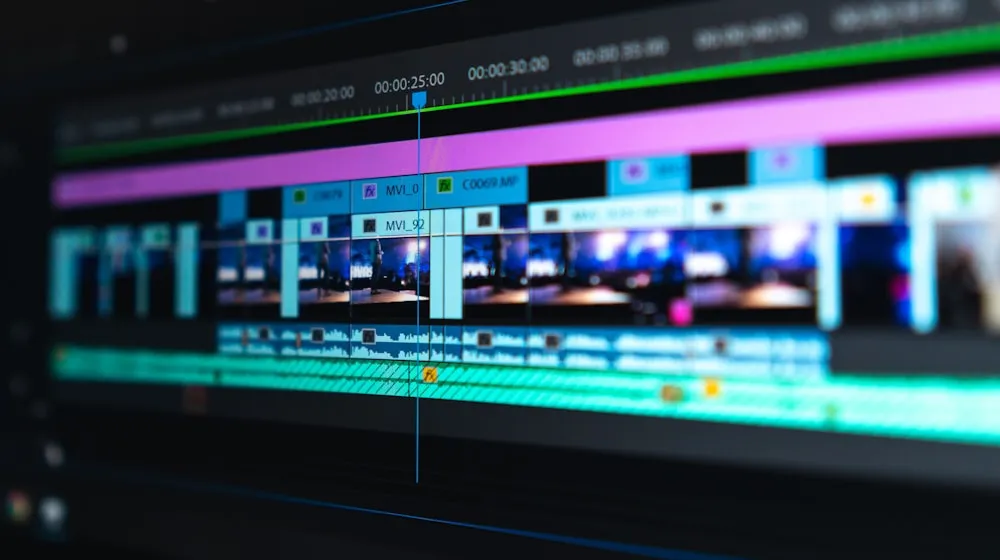
Throughput economics: the same master edit should spawn platform-ready cutdowns in hours, not days.
Throughput Debt on Release Week
Throughput debt accumulates when your pipeline cannot absorb parallel deliverables. A four-minute music video master might be finished Tuesday, but TikTok teasers, YouTube pre-roll fifteen-second hooks, and Instagram Reels with burned-in lyrics still sit in queue Thursday—after playlist pitch windows narrow and ad buyers lock creative.
Free tools can finish any one of those tasks. The economic question is whether your stack finishes all of them before opportunity cost exceeds subscription spend. A three-seat Resolve Studio deployment at roughly $295 per seat annually looks expensive until you model one missed Friday ad launch against paid media burn.
According to non-linear editing history, the industry moved from linear suites to desktop NLE precisely because recombination—cutdowns, versioning, alternate endings—became the product, not the hero timeline alone.
Pipeline Stages: Edit to Social
Map your campaign pipeline explicitly. Stage one: assembly and color on the hero music video. Stage two: narrative cutdowns—verse hooks, chorus lifts, bridge teasers. Stage three: paid social variants with safe zones and CTA end cards. Stage four: organic social exports with captions, aspect ratios, and motion titles tuned per platform.
Premium creative video suite software earns its line item when stages two through four reuse stage-one decisions—grades, fonts, lower-thirds, stem sync—without manual rebuild. Shared media libraries and template systems are not convenience features; they are inventory control for visual brand assets across a release cycle.
Task Time: Free Stack vs Premium Suite
| Post Task | Free / Fragmented Stack | Premium Integrated Suite | Hours Saved (Typical MV Campaign) |
|---|---|---|---|
| Color grade (hero + 3 cutdowns) | 6.5 hrs — round-trip XML, separate grade app | 2.0 hrs — shared LUTs, timeline-grade in NLE | 4.5 |
| Captions (YT, TikTok, IG variants) | 4.0 hrs — manual SRT, re-timing per platform | 1.2 hrs — auto-transcribe + style presets | 2.8 |
| Aspect ratio exports (16:9, 9:16, 1:1, 4:5) | 5.5 hrs — duplicate sequences, reframe by hand | 1.8 hrs — batch presets, smart reframe | 3.7 |
| Motion titles & lower-thirds | 7.0 hrs — After Effects per variant, no shared library | 2.5 hrs — MOGRT / Fusion templates | 4.5 |
| Codec / proxy handoff to ads team | 3.0 hrs — re-encode, Slack version chaos | 0.8 hrs — proxy workflow + review link | 2.2 |
| Total illustrative campaign | 26.0 hrs | 8.3 hrs | ~17.7 hrs |
Figures assume a mid-budget indie label release with one hero video and three derivative cutdowns across four aspect ratios. Labor valued at $45/hr implies roughly $795 in recoverable time per drop—before counting faster time-to-publish.
Time-to-Publish: Free vs Premium Pipeline
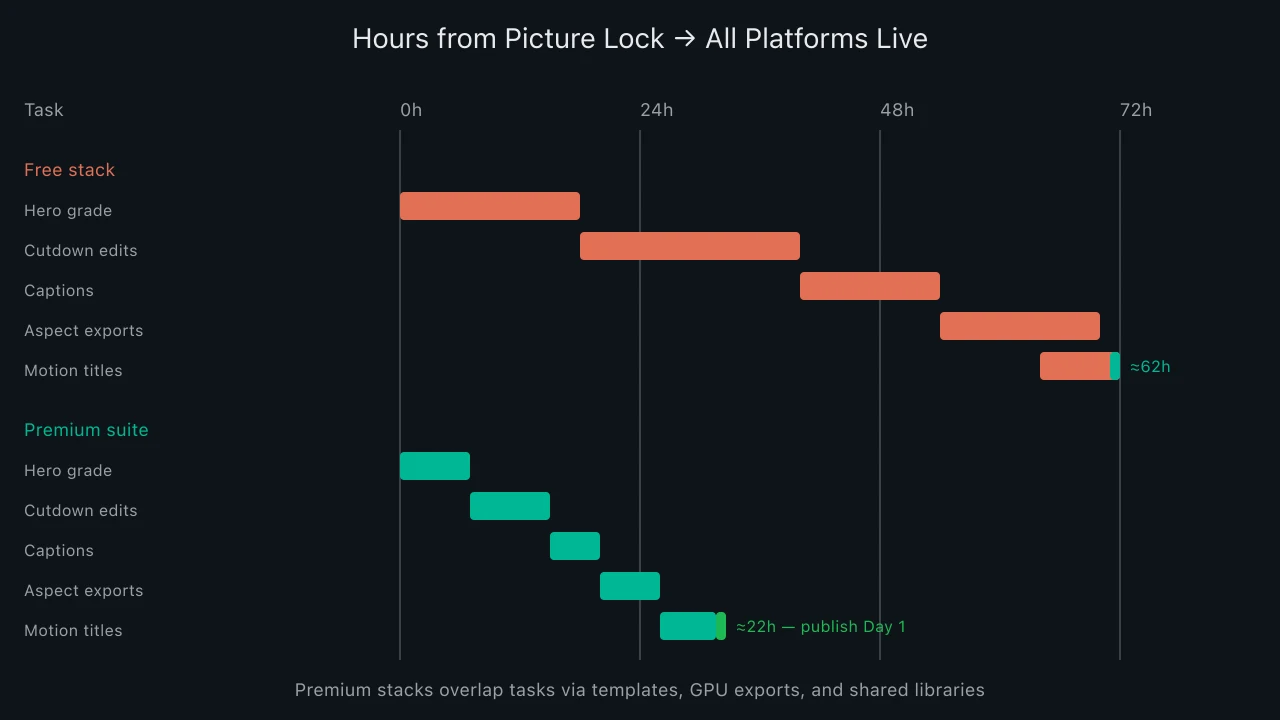
Music video campaign time-to-publish comparison
The Gantt view is illustrative—not every campaign needs seventy-two hours—but the shape holds: fragmented free tooling serializes work premium suites parallelize. Shaving forty hours off release week is often the difference between riding a Spotify editorial moment and posting into silence.
Shared Media Libraries and Brand Consistency
Shared media libraries centralize logos, approved typefaces, label sting animations, artist headshots, and stem-linked waveform overlays. When three editors touch the same release, libraries prevent "close enough" color drift between YouTube hero and TikTok hook.
Premium creative video suite software ties libraries to project templates: drop a new master timeline into the label template and cutdown sequences inherit lower-thirds, safe margins, and export naming conventions. That is production speed as operational discipline, not heroics.
Julian Cole's release finance lens: treat library maintenance as capex. One day building MOGRT packs and LUT bins saves ten hours per subsequent single—compounding across a twelve-track album cycle.
GPU Acceleration and Export Throughput
GPU acceleration matters when export queues multiply. A hero ProRes master plus four H.264 social variants plus ProRes HQ for paid ads can saturate a CPU-only workstation overnight. NVIDIA NVENC, Apple Silicon media engines, and DaVinci's GPU decode paths turn overnight renders into working-lunch exports.
Throughput economics scale with release frequency. An artist dropping monthly singles feels GPU limits monthly; a label roster of six acts multiplies the pain. Premium suites optimize codec paths—H.264, H.265, AV1 where supported—and expose batch export with preset hooks.
According to video codec evolution, each platform generation adds bitrate-efficient formats; suites that lag codec support force manual transcoding outside the NLE—another serial bottleneck.
Templates for Music Video Cutdowns
Music video cutdown templates encode editorial grammar: chorus-in at bar one for TikTok, verse-first for YouTube Shorts, lyric-forward framing for Instagram. Build templates once—marker conventions, alt aspect-ratio sequences nested under hero timeline, pre-built motion title slots—and junior editors ship variants without re-inventing structure.
After Effects MOGRTs, Resolve Fusion macros, and FCP Motion templates each trade flexibility for speed. Pick the ecosystem your roster already uses; cross-app template portability still wastes hours. Templates should include legal slates, distributor logos, and parental advisory badges so compliance travels with the edit.
Collaboration and Versioning
Collaboration versioning separates amateur drops from label-grade campaigns. Frame.io, Adobe Team Projects, Blackmagic Cloud, and similar review layers timestamp comments on timecode, track approval states, and prevent "FINAL_v7_REAL_FINAL.mov" email chains.
When artist management, label marketing, and ad agency share one review link, feedback consolidates. Premium creative video suite software integrations push approved notes back into the NLE as markers—reducing miscommunication that causes re-export cascades.
Version control also protects masters. Locked hero timelines with branched cutdown sequences let you patch a color fix once and propagate via shared grades rather than reopening every export manually.
Codec and Proxy Workflows
Codec and proxy workflows keep laptops responsive on 4K and 6K music video footage shot on ARRI, RED, or high-bitrate LOG from mirrorless bodies. Ingest high-resolution masters, edit on ProRes or DNxHR proxies, relink for final grade and export.
Free NLEs often support proxies; premium suites differentiate with intelligent cache management, optimized debayer for RAW, and seamless relink when ad teams request broadcast-spec deliverables mid-campaign. Proxy discipline matters when directors deliver late and you still owe platforms twelve files by midnight.
Handoff to paid media buyers expects mezzanine specs—1080p H.264 with limited B-frames, or platform-specific ad containers. Presets stored in the suite eliminate Slack Q&A about bitrate ceilings.
Export Presets for YouTube, TikTok, and Instagram
Export presets for YouTube, TikTok, and Instagram encode resolution, frame rate, audio loudness targets, and caption burn-in rules per platform. YouTube favors 1080p or 4K at 24 fps with −14 LUFS integrated loudness for music content; TikTok and Reels want 1080×1920, 30 or 60 fps, captions clear of UI chrome; Instagram feed 1:1 and 4:5 still matter for carousel campaigns even as Reels dominate.
Premium creative video suite software ships or community-shares preset packs; smarter teams build label-specific presets validated against each platform's current upload guidance. One-click batch export across presets beats opening HandBrake after every render.
According to YouTube's encoding recommendations, re-uploading poorly encoded files forces platform recompression that softens detail—starting from spec preserves the grade you paid to achieve.
Team Seats vs Solo Freelancers
Team seats versus solo freelancers is a capacity planning decision, not a software fetish. Three in-house seats with shared libraries and templates amortize across the roster; a freelance hero editor on free DaVinci may deliver stunning hero cuts but bottleneck cutdowns when booked on the next client's shoot.
Model fully loaded cost: subscription + seat hardware + template maintenance versus day-rate freelancers × expected deliverables per release. If your calendar shows four simultaneous releases, freelancer elasticity breaks; seats win. If you ship two singles a year, a trusted freelance pipeline on free tools may outperform idle subscriptions.
Hybrid models work: retain freelance colorists for hero grades while in-house editors run templated cutdown factories on premium suites—specialists on creative peaks, systems on volume.
When Free Stacks Are Fine
Free stacks remain rational when deliverable count is low, timelines are generous, and one skilled generalist owns the entire pipeline. DaVinci Resolve free tier, CapCut desktop, or Blender VSE can finish a single hero music video beautifully if nobody needs six platform variants before Friday.
Bedroom artists posting one vertical performance clip per month should not buy three Creative Cloud seats. Documentary-style one-offs with six-week post schedules tolerate manual exports. Free shines when throughput debt is zero—when the campaign is one asset, one platform, one deadline with slack.
Upgrade triggers are observable: missed ad launch dates, caption rework loops, artist complaints about inconsistent looks, or export queues blocking the next project. Those signals mean throughput debt exceeds subscription cost.
Production Speed and Stream Velocity
Production speed links to stream velocity indirectly but meaningfully. Coordinated visual drops—hero video, Shorts, TikTok sound-on hooks, Instagram carousels—feed algorithmic surfaces that reward freshness and watch-time across formats. Arriving forty-eight hours late with mismatched captions does not kill a career, but it surrenders leverage during the save-rate window covered elsewhere on this desk.
Premium creative video suite software is infrastructure for that coordination. The ROI is measured in hours returned to creative iteration—better thumbnails, tighter hooks, another ad variant—not merely files exported.
Budgeting Premium Post Infrastructure
Build a simple post line item: seats × annual license + workstation GPU upgrade amortized over thirty-six months + template build days. Compare against freelance quotes for hero plus cutdown package on identical brief. If premium internal throughput saves more than one freelance cycle per quarter, internalize.
Labels bundling video with audio production should negotiate suite bundles—Adobe Creative Cloud for teams, Avid suites for hybrid workflows—rather than paying retail per editor ad hoc. Consolidation also simplifies IT support when tours cancel and remote editors need license transfers overnight.
Case Study: Indie Label Friday Drop
An indie R&B label planned a Friday midnight release with Spotify Canvas loop, YouTube premiere, and TikTok spark ads. Picture lock landed Tuesday noon—seventy-two hours to everything live. Premium Resolve Studio with shared templates and NVENC exports cleared hero grade, four vertical cutdowns, and caption variants by Wednesday 6 p.m.; Thursday went to ad trafficking and artist approval via cloud review. A prior single on fragmented free tools missed TikTok ad approval until Sunday—costing roughly $1,800 in held media spend. The suite subscription did not cause the win; throughput did.
Security and Asset Governance
Unreleased masters leak from sloppy file shares. Premium suites paired with review platforms offer permissioned links, watermarking, and download controls—relevant when music video embargoes precede album reveals. Governance is not flashy, but one leak destroys campaign timing more surely than a soft grade.
FAQ: Premium Creative Video Suite Software
Which creative video suite is best for music campaigns?
No universal winner. Adobe fits motion-heavy titles; Resolve fits color-centric pipelines; Final Cut suits Apple-only shops wanting speed. Match existing editor skills and template investment.
Is DaVinci Resolve free enough for label work?
Often yes for hero edits and basic cutdowns. Studio adds noise reduction, advanced HDR, and collaboration features that matter at volume—not for every bedroom release.
How fast does premium software pay for itself?
If it saves fifteen or more labor hours per release and you drop monthly, ROI typically lands within one quarter at indie labor rates.
What GPU should we prioritize?
NVIDIA RTX class for CUDA/NVENC in Resolve and Adobe; Apple M-series Pro/Max for FCP/Motion. VRAM headroom matters for 4K+ timelines with heavy effects.
Should we outsource cutdowns instead of buying seats?
Outsource when volume is unpredictable. Keep templates in-house if brand consistency and turnaround under twenty-four hours are non-negotiable.
Premium Creative Video Suite Summary
Creative video suite software at premium tiers buys throughput—shared libraries, GPU exports, cutdown templates, collaboration versioning, and platform presets that collapse the edit → cutdowns → ads → social pipeline from days to hours. Free stacks remain viable when deliverables are few and calendars forgiving. For labels racing release-week algorithm windows, production speed is campaign economics: model task times honestly, invest where serial bottlenecks repeat, and treat template libraries as compounding assets across every music video you ship.


